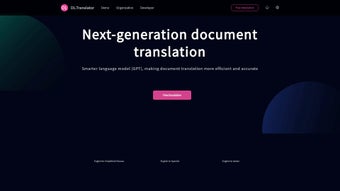

Download DLTranslator – AI‑Powered Document Translation Tool
Introduction: Why DLTranslator Stands Out in the Crowded Translation Market
In today’s globalized economy, the ability to translate documents quickly, accurately, and securely is no longer a luxury—it’s a necessity. DLTranslator answers that call with an AI‑driven engine built on the latest Generative Pre‑training Transformer (GPT) technology. Unlike traditional rule‑based translators, DLTranslator learns from massive multilingual corpora, delivering near‑human fluency across a broad spectrum of document types, from dense legal contracts to vibrant gaming manuals.
What truly sets the platform apart is its seamless handling of both editable files (DOCX, XLSX, PPT) and static formats (PDF, EPUB), combined with powerful optical character recognition (OCR) that extracts text from scanned images and embedded graphics. Users can instantly test the service with a free automatic translation of a document section, giving a risk‑free glimpse of the quality they can expect. Security is baked in: all uploads are encrypted end‑to‑end, and only the document owner retains the keys to view or delete their data.
Whether you’re a multinational corporation needing batch‑translation of compliance reports, a freelance translator looking for a reliable AI assistant, or a gamer wanting localized subtitles, DLTranslator offers a flexible, secure, and cost‑effective solution. While the AI can rival professional translators in speed and consistency, it’s important to remember that subtle cultural nuances may still benefit from a human reviewer. Overall, DLTranslator bridges the gap between raw machine output and polished multilingual content, making it a compelling choice for anyone who values speed, security, and high‑quality translation.
Key Features That Make DLTranslator a Must‑Have Tool
- Multi‑Format Support: Translate PDFs, DOCX, XLSX, PPT, and EPUB without converting files first.
- Advanced OCR Engine: Extract and translate text from scanned images, screenshots, and photo‑based PDFs.
- Broad Language Coverage: Native‑level translation for English, Spanish, Chinese, German, Japanese, Russian, and many more.
- Domain‑Specific Optimization: Tailored models for legal, finance, gaming, and technical documentation ensure terminology accuracy.
- Free Sample Translation: Upload a document and receive an instant, no‑cost translation of a selected section.
- End‑to‑End Encryption: All files are encrypted during upload, processing, and storage; only the owner can decrypt.
- Batch Processing: Queue multiple files for simultaneous translation, ideal for large projects.
- Version History & Export Options: Keep track of translation revisions and export results in original format or as plain text.
- API Access: Integrate DLTranslator’s engine into your own applications, websites, or workflow tools.
- Continuous Updates: The AI model is refreshed monthly with new data, improving accuracy and expanding language support.
Installation, Usage & Compatibility: Getting Started in Minutes
DLTranslator is a cloud‑based service, which means there is no heavy software to install on your workstation. To begin, simply visit the official website, create a free account, and you’ll be greeted by an intuitive dashboard. The upload interface accepts files up to 200 MB each; larger projects can be split into smaller chunks or processed via the API.
After selecting a file, choose the source and target languages, and optionally enable the OCR toggle if your document contains images. The AI starts translating within seconds, and you can monitor progress through a real‑time status bar. Once complete, a download button appears, allowing you to retrieve the translated file in its original format.
For power users, the API key is generated in the “Developer” section and can be used with standard REST calls—perfect for integrating translation into CI/CD pipelines or content management systems.
In terms of compatibility, DLTranslator works flawlessly across all major operating systems because it runs entirely in the browser. Whether you’re on Windows 10/11, macOS Ventura, Linux distributions, Android 13, or iOS 17, the web portal adapts to your device’s screen size and input methods. The only requirement is a modern browser that supports TLS 1.3 for secure connections—Chrome, Edge, Firefox, Safari, and their mobile equivalents all qualify.
For organizations with strict network policies, a VPN or corporate proxy can be configured without affecting functionality. Because the service never stores files on local disks, there’s no risk of residual data on shared machines, reinforcing the platform’s security posture. Finally, DLTranslator offers multilingual help guides and 24/7 chat support, ensuring that users of any technical level can troubleshoot issues quickly.
Whether you’re a solo freelancer or part of a large enterprise, the onboarding process takes less than five minutes, and the learning curve is virtually nonexistent.
Pros, Cons & Frequently Asked Questions – Your Final Decision Guide
Pros
- High‑quality, near‑human translations powered by the latest GPT models.
- Supports a wide range of document formats and OCR for image‑based files.
- End‑to‑end encryption guarantees data privacy.
- Free sample translation lets users evaluate accuracy before committing.
- Scalable API enables integration into custom workflows.
- Regular AI model updates keep language support current.
- User‑friendly web interface requires no local installation.
Cons
- Nuanced cultural expressions may still need human post‑editing.
- Large batch jobs can be limited by the 200 MB per‑file upload cap.
- Advanced features such as API access are behind a paid tier.
- OCR accuracy depends on the quality of the scanned source.
- No offline desktop client for users with restricted internet access.
Can DLTranslator handle legal contracts without losing critical terminology?
Yes. DLTranslator includes a domain‑specific model for legal documents that preserves key terms, clauses, and formatting. However, for binding agreements, a qualified legal translator should review the final output to ensure absolute compliance.
Is my data really secure during translation?
All uploads are encrypted with TLS 1.3 during transmission and stored using AES‑256 encryption on the server. Only the account owner possesses the decryption key, and files are automatically purged after 30 days unless you choose to retain them.
What languages are supported beyond the six listed in the description?
DLTranslator currently supports over 50 languages, including French, Italian, Portuguese, Arabic, Korean, and Hindi. The full list is available in the “Languages” tab of the dashboard.
How does the free sample translation work?
When you upload a document, you can select “Free Sample” which extracts the first 500 words (or the first slide for presentations) and translates it at no cost. This lets you evaluate speed and accuracy before committing to a full‑size job.
Can I integrate DLTranslator with my existing CMS?
Absolutely. After generating an API key in the “Developer” section, you can call the REST endpoint from any CMS (WordPress, Drupal, Joomla, etc.) to translate content on‑the‑fly or in batch mode.
Conclusion & Call to Action
DLTranslator combines cutting‑edge AI, robust security, and versatile format support into a single, cloud‑native service that meets the demands of modern multilingual workflows. Its strengths—high‑quality translation, OCR capability, and seamless API access—make it an attractive option for professionals across legal, financial, gaming, and corporate sectors. While the occasional need for human nuance remains, the platform dramatically reduces translation turnaround time and cost, especially for large document sets. If you’re looking for a secure, scalable, and easy‑to‑use translation solution, the best way to experience its power is to download DLTranslator today, test the free sample, and explore the paid plans that unlock full batch processing and API features. Empower your global communications, protect your data, and stay ahead of competitors by leveraging AI‑driven translation that’s built for the future.



.png)



